Extension: ClaudlineReaderv3.zip
This extension replicates the functionality of the Beeline Reader Chrome extension with the added benefit of being free. If the .crx file above doesn’t work, you can also load the code files and icons below into a folder.
Content
Code
background.js
// Background service worker for Beeline Reader


// Handle keyboard shortcut

chrome.commands.onCommand.addListener((command) => {

  if (command === 'toggle-beeline') {

    chrome.tabs.query({ active: true, currentWindow: true }, async (tabs) => {

      if (tabs[0]) {

        const tab = tabs[0];

        const url = new URL(tab.url);

        const domain = url.hostname;

        // Get current settings

        const data = await chrome.storage.sync.get(['enabled', 'enabledSites']);

        const enabledSites = data.enabledSites || {};

        const globalEnabled = data.enabled !== false;

        // Determine current state for this site

        const currentlyEnabled = globalEnabled || enabledSites[domain] === true;

        // Toggle: if currently enabled, disable for this site; if disabled, enable for this site

        if (currentlyEnabled) {

          // Disable for this site specifically

          enabledSites[domain] = false;

        } else {

          // Enable for this site specifically

          enabledSites[domain] = true;

        }

        await chrome.storage.sync.set({ enabledSites });

        // Reload the tab to apply changes

        chrome.tabs.reload(tab.id);

      }

    });

  }

});
content.js
// Content script for applying Beeline Reader effect - Word-based version


let isEnabled = false;

let color1 = '#FF6B6B';

let color2 = '#4ECDC4';

let wordsPerCycle = 25;

let intensity = 1.0;

let skipSelectors = [];

let processedNodes = new WeakSet();

let isProcessing = false;

let hasProcessedPage = false;

let isDarkMode = false;


// Load settings and apply effect

chrome.storage.sync.get(['enabled', 'color1', 'color2', 'wordsPerCycle', 'intensity', 'enabledSites', 'skipSelectors'], (data) => {

  const domain = location.hostname;

  const enabledSites = data.enabledSites || {};

  const globalEnabled = data.enabled !== false;

  // Check if enabled: global on OR site specifically enabled, AND site not specifically disabled

  if (enabledSites[domain] === false) {

    isEnabled = false;

  } else if (enabledSites[domain] === true) {

    isEnabled = true;

  } else {

    isEnabled = globalEnabled;

  }

  color1 = data.color1 || '#FF6B6B';

  color2 = data.color2 || '#4ECDC4';

  wordsPerCycle = data.wordsPerCycle || 25;

  intensity = data.intensity !== undefined ? data.intensity : 1.0;

  skipSelectors = data.skipSelectors || [];

  if (isEnabled) {

    // Only process if tab is visible or becomes visible

    if (document.visibilityState === 'visible') {

      if (document.readyState === 'loading') {

        document.addEventListener('DOMContentLoaded', applyBeelineEffect);

      } else {

        applyBeelineEffect();

      }

    }

  }

});


// Process when tab becomes visible

document.addEventListener('visibilitychange', () => {

  if (isEnabled && document.visibilityState === 'visible' && !hasProcessedPage && !isProcessing) {

    applyBeelineEffect();

  }

});


// Listen for settings changes

chrome.storage.onChanged.addListener((changes, namespace) => {

  if (namespace === 'sync') {

    let needsReapply = false;

    if (changes.enabled || changes.enabledSites) {

      const domain = location.hostname;

      chrome.storage.sync.get(['enabled', 'enabledSites'], (data) => {

        const enabledSites = data.enabledSites || {};

        const globalEnabled = data.enabled !== false;

        if (enabledSites[domain] === false) {

          isEnabled = false;

        } else if (enabledSites[domain] === true) {

          isEnabled = true;

        } else {

          isEnabled = globalEnabled;

        }

        location.reload();

      });

      return;

    }

    if (changes.color1) {

      color1 = changes.color1.newValue;

      needsReapply = true;

    }

    if (changes.color2) {

      color2 = changes.color2.newValue;

      needsReapply = true;

    }

    if (changes.wordsPerCycle) {

      wordsPerCycle = changes.wordsPerCycle.newValue;

      needsReapply = true;

    }

    if (changes.intensity) {

      intensity = changes.intensity.newValue;

      needsReapply = true;

    }

    if (changes.skipSelectors) {

      skipSelectors = changes.skipSelectors.newValue;

      needsReapply = true;

    }

    if (needsReapply) {

      location.reload();

    }

  }

});


// Detect if page uses dark mode

function detectDarkMode() {

  const body = document.body;

  if (!body) return false;

  // First check body background

  let bgColor = window.getComputedStyle(body).backgroundColor;

  // If transparent or rgba with alpha 0, check html element

  if (bgColor === 'transparent' || bgColor === 'rgba(0, 0, 0, 0)') {

    const html = document.documentElement;

    bgColor = window.getComputedStyle(html).backgroundColor;

  }

  // Still transparent? Check the actual default text color instead

  if (bgColor === 'transparent' || bgColor === 'rgba(0, 0, 0, 0)') {

    const textColor = window.getComputedStyle(body).color;

    const rgb = textColor.match(/\d+/g);

    if (!rgb || rgb.length < 3) return false;

    const r = parseInt(rgb[0]);

    const g = parseInt(rgb[1]);

    const b = parseInt(rgb[2]);

    const luminance = (0.299 * r + 0.587 * g + 0.114 * b);

    // If text is light colored (high luminance), it's dark mode

    return luminance > 128;

  }

  // Parse background RGB values

  const rgb = bgColor.match(/\d+/g);

  if (!rgb || rgb.length < 3) return false;

  const r = parseInt(rgb[0]);

  const g = parseInt(rgb[1]);

  const b = parseInt(rgb[2]);

  // Calculate luminance

  const luminance = (0.299 * r + 0.587 * g + 0.114 * b);

  // If background luminance is below 128, it's dark mode

  return luminance < 128;

}


// Convert hex color to RGB object

function hexToRgb(hex) {

  const result = /^#?([a-f\d]{2})([a-f\d]{2})([a-f\d]{2})$/i.exec(hex);

  return result ? {

    r: parseInt(result[1], 16),

    g: parseInt(result[2], 16),

    b: parseInt(result[3], 16)

  } : { r: 0, g: 0, b: 0 };

}


// Interpolate between two colors with intensity

function interpolateColor(color1, color2, factor) {

  const c1 = hexToRgb(color1);

  const c2 = hexToRgb(color2);

  const r = Math.round(c1.r + (c2.r - c1.r) * factor);

  const g = Math.round(c1.g + (c2.g - c1.g) * factor);

  const b = Math.round(c1.b + (c2.b - c1.b) * factor);

  const baseValue = isDarkMode ? 255 : 0;

  // For dark mode, invert intensity behavior

  // High intensity = more visible (closer to white)

  // Low intensity = more colorful (further from white)

  const effectiveIntensity = isDarkMode ? (intensity) : intensity;

  const finalR = Math.round(baseValue + (r - baseValue) * effectiveIntensity);

  const finalG = Math.round(baseValue + (g - baseValue) * effectiveIntensity);

  const finalB = Math.round(baseValue + (b - baseValue) * effectiveIntensity);

  return `rgb(${finalR}, ${finalG}, ${finalB})`;

}


// Get color for a word at a specific position

function getColorForPosition(position) {

  const baseColor = isDarkMode ? '#FFFFFF' : '#000000';

  const fullCycle = wordsPerCycle * 2;

  const posInCycle = position % fullCycle;

  const quarter = wordsPerCycle / 2;

  if (posInCycle < quarter) {

    const factor = posInCycle / quarter;

    return interpolateColor(baseColor, color1, factor);

  } else if (posInCycle < wordsPerCycle) {

    const factor = (posInCycle - quarter) / quarter;

    return interpolateColor(color1, baseColor, factor);

  } else if (posInCycle < wordsPerCycle + quarter) {

    const factor = (posInCycle - wordsPerCycle) / quarter;

    return interpolateColor(baseColor, color2, factor);

  } else {

    const factor = (posInCycle - wordsPerCycle - quarter) / quarter;

    return interpolateColor(color2, baseColor, factor);

  }

}


// Check if element should be skipped

function shouldSkipElement(element) {

  if (!element || element.nodeType !== Node.ELEMENT_NODE) return false;

  const defaultSkipTags = ['SCRIPT', 'STYLE', 'NOSCRIPT', 'IFRAME', 'CANVAS', 'SVG', 'VIDEO', 'AUDIO', 'OBJECT', 'EMBED'];

  if (defaultSkipTags.includes(element.nodeName)) return true;

  // Check custom skip selectors

  if (skipSelectors && skipSelectors.length > 0) {

    try {

      for (const selector of skipSelectors) {

        if (selector.trim() && element.matches(selector.trim())) {

          return true;

        }

      }

    } catch (e) {

      // Invalid selector, ignore

    }

  }

  return false;

}


// Check if element is block-level

function isBlockElement(node) {

  if (node.nodeType !== Node.ELEMENT_NODE) return false;

  const blockElements = ['P', 'DIV', 'H1', 'H2', 'H3', 'H4', 'H5', 'H6',

                         'LI', 'UL', 'OL', 'BLOCKQUOTE', 'PRE', 'HR',

                         'TABLE', 'TR', 'TD', 'TH', 'HEADER', 'FOOTER',

                         'SECTION', 'ARTICLE', 'NAV', 'ASIDE', 'MAIN'];

  return blockElements.includes(node.nodeName);

}


// Tokenize text into words and spaces

function tokenize(text) {

  const tokens = [];

  let currentWord = '';

  for (let i = 0; i < text.length; i++) {

    const char = text[i];

    if (/\s/.test(char)) {

      if (currentWord) {

        tokens.push({ type: 'word', value: currentWord });

        currentWord = '';

      }

      tokens.push({ type: 'space', value: char });

    } else {

      currentWord += char;

    }

  }

  if (currentWord) {

    tokens.push({ type: 'word', value: currentWord });

  }

  return tokens;

}


// Process text node with gradient (word-based)

function processTextNode(textNode, startPosition) {

  const text = textNode.textContent;

  if (!text.trim()) return startPosition;

  const parent = textNode.parentNode;

  if (!parent || shouldSkipElement(parent)) return startPosition;

  // Check if already processed

  if (parent.hasAttribute && parent.hasAttribute('data-beeline-processed')) {

    return startPosition;

  }

  const tokens = tokenize(text);

  const fragment = document.createDocumentFragment();

  let wordCount = startPosition;

  for (const token of tokens) {

    if (token.type === 'space') {

      fragment.appendChild(document.createTextNode(token.value));

    } else {

      // token.type === 'word'

      const span = document.createElement('span');

      span.textContent = token.value;

      span.style.color = getColorForPosition(wordCount);

      span.style.display = 'inline';

      span.setAttribute('data-beeline', 'true');

      fragment.appendChild(span);

      wordCount++;

    }

  }

  try {

    parent.replaceChild(fragment, textNode);

  } catch (e) {

    console.warn('Beeline: Failed to process text node', e);

    return wordCount;

  }

  return wordCount;

}


// Process element and children recursively

function processElement(element, wordPosition = 0, depth = 0) {

  // Limit recursion depth

  if (depth > 100) return wordPosition;

  if (shouldSkipElement(element)) return wordPosition;

  // Skip if already processed

  if (element.hasAttribute && element.hasAttribute('data-beeline-processed')) {

    return wordPosition;

  }

  let position = wordPosition;

  const childNodes = Array.from(element.childNodes);

  for (const node of childNodes) {

    if (node.nodeType === Node.TEXT_NODE) {

      position = processTextNode(node, position);

    } else if (node.nodeType === Node.ELEMENT_NODE) {

      if (isBlockElement(node)) {

        // Reset position for block elements

        processElement(node, 0, depth + 1);

      } else {

        // Continue position for inline elements

        position = processElement(node, position, depth + 1);

      }

    }

  }

  // Mark as processed

  if (element.setAttribute) {

    element.setAttribute('data-beeline-processed', 'true');

  }

  return position;

}


// Apply Beeline effect to the page

function applyBeelineEffect() {

  if (isProcessing || hasProcessedPage) return;

  isProcessing = true;

  // Detect dark mode before processing

  isDarkMode = detectDarkMode();

  console.log(`Beeline: Starting to apply effect (word-based, ${isDarkMode ? 'dark' : 'light'} mode detected)...`);

  try {

    const body = document.body;

    if (!body) {

      console.warn('Beeline: Document body not found');

      isProcessing = false;

      return;

    }

    const startTime = Date.now();

    // Get all text-containing elements

    const walker = document.createTreeWalker(

      body,

      NodeFilter.SHOW_ELEMENT,

      {

        acceptNode: function(node) {

          if (shouldSkipElement(node)) return NodeFilter.FILTER_REJECT;

          if (node.hasAttribute && node.hasAttribute('data-beeline-processed')) {

            return NodeFilter.FILTER_REJECT;

          }

          return NodeFilter.FILTER_ACCEPT;

        }

      }

    );

    const elementsToProcess = [];

    let currentNode;

    while (currentNode = walker.nextNode()) {

      if (isBlockElement(currentNode)) {

        elementsToProcess.push(currentNode);

      }

    }

    console.log(`Beeline: Found ${elementsToProcess.length} elements to process`);

    // Process in chunks

    let index = 0;

    const chunkSize = 10;

    function processChunk() {

      const chunk = elementsToProcess.slice(index, index + chunkSize);

      for (const element of chunk) {

        try {

          processElement(element, 0);

        } catch (e) {

          console.warn('Beeline: Error processing element', e);

        }

      }

      index += chunkSize;

      if (index < elementsToProcess.length) {

        // Continue processing

        if ('requestIdleCallback' in window) {

          requestIdleCallback(processChunk, { timeout: 100 });

        } else {

          setTimeout(processChunk, 10);

        }

      } else {

        const elapsed = Date.now() - startTime;

        console.log(`Beeline: Finished processing in ${elapsed}ms`);

        isProcessing = false;

        hasProcessedPage = true;

      }

    }

    processChunk();

  } catch (e) {

    console.error('Beeline: Error applying effect', e);

    isProcessing = false;

  }

}
manifest.json
{

  "manifest_version": 3,

  "name": "Claudeline Reader",

  "version": "3.2.6",

  "description": "Improve reading speed with color gradients that guide your eyes through text",

  "permissions": ["storage", "activeTab"],

  "host_permissions": ["<all_urls>"],

  "action": {

    "default_popup": "popup.html",

    "default_icon": {

      "16": "icons/icon16.png",

      "48": "icons/icon48.png",

      "128": "icons/icon128.png"

    }

  },

  "options_page": "options.html",

  "content_scripts": [

    {

      "matches": ["<all_urls>"],

      "js": ["content.js"],

      "run_at": "document_idle"

    }

  ],

  "commands": {

    "toggle-beeline": {

      "suggested_key": {

        "default": "Alt+B",

        "mac": "Alt+B"

      },

      "description": "Toggle Beeline Reader on/off for current site"

    }

  },

  "background": {

    "service_worker": "background.js"

  },

  "icons": {

    "16": "icons/icon16.png",

    "48": "icons/icon48.png",

    "128": "icons/icon128.png"

  }

}
options.html
<!DOCTYPE html>

<html>

<head>

  <meta charset="UTF-8">

  <title>Beeline Reader Settings</title>

  <style>

    body {

      font-family: -apple-system, BlinkMacSystemFont, 'Segoe UI', Roboto, sans-serif;

      max-width: 800px;

      margin: 0 auto;

      padding: 40px 20px;

      background: #f5f5f5;

    }

    .container {

      background: white;

      border-radius: 12px;

      padding: 40px;

      box-shadow: 0 2px 8px rgba(0,0,0,0.1);

    }

    .header {

      display: flex;

      align-items: center;

      gap: 16px;

      margin-bottom: 32px;

      padding-bottom: 24px;

      border-bottom: 2px solid #e0e0e0;

    }

    .header img {

      width: 48px;

      height: 48px;

    }

    .header h1 {

      margin: 0;

      font-size: 28px;

      font-weight: 600;

      color: #333;

    }

    .section {

      margin-bottom: 32px;

    }

    .section h2 {

      font-size: 18px;

      font-weight: 600;

      color: #333;

      margin: 0 0 8px 0;

    }

    .section p {

      margin: 0 0 16px 0;

      color: #666;

      font-size: 14px;

      line-height: 1.6;

    }

    .control-group {

      margin-bottom: 24px;

    }

    .control-group label {

      display: block;

      font-size: 14px;

      font-weight: 500;

      color: #555;

      margin-bottom: 8px;

    }

    .toggle-container {

      display: flex;

      align-items: center;

      gap: 12px;

      padding: 16px;

      background: #f9f9f9;

      border-radius: 8px;

    }

    .toggle-switch {

      position: relative;

      width: 56px;

      height: 30px;

    }

    .toggle-switch input {

      opacity: 0;

      width: 0;

      height: 0;

    }

    .slider {

      position: absolute;

      cursor: pointer;

      top: 0;

      left: 0;

      right: 0;

      bottom: 0;

      background-color: #ccc;

      transition: .3s;

      border-radius: 30px;

    }

    .slider:before {

      position: absolute;

      content: "";

      height: 22px;

      width: 22px;

      left: 4px;

      bottom: 4px;

      background-color: white;

      transition: .3s;

      border-radius: 50%;

    }

    input:checked + .slider {

      background-color: #4ECDC4;

    }

    input:checked + .slider:before {

      transform: translateX(26px);

    }

    .color-picker-group {

      display: grid;

      grid-template-columns: 1fr 1fr;

      gap: 16px;

    }

    .color-picker {

      padding: 16px;

      background: #f9f9f9;

      border-radius: 8px;

    }

    .color-picker h3 {

      margin: 0 0 12px 0;

      font-size: 14px;

      font-weight: 500;

      color: #555;

    }

    .color-input-container {

      display: flex;

      align-items: center;

      gap: 12px;

      padding: 12px;

      border: 2px solid #ddd;

      border-radius: 8px;

      background: white;

    }

    input[type="color"] {

      width: 60px;

      height: 60px;

      border: none;

      border-radius: 6px;

      cursor: pointer;

    }

    input[type="color"]::-webkit-color-swatch-wrapper {

      padding: 0;

    }

    input[type="color"]::-webkit-color-swatch {

      border: 2px solid #ddd;

      border-radius: 6px;

    }

    .color-value {

      font-family: monospace;

      font-size: 16px;

      color: #333;

      font-weight: 500;

    }

    .slider-container {

      padding: 16px;

      background: #f9f9f9;

      border-radius: 8px;

    }

    input[type="range"] {

      width: 100%;

      margin: 12px 0;

      height: 6px;

      border-radius: 3px;

      background: #ddd;

      outline: none;

    }

    input[type="range"]::-webkit-slider-thumb {

      width: 20px;

      height: 20px;

      border-radius: 50%;

      background: #4ECDC4;

      cursor: pointer;

    }

    .slider-info {

      display: flex;

      justify-content: space-between;

      align-items: center;

      margin-top: 8px;

    }

    .slider-value {

      font-size: 18px;

      color: #333;

      font-weight: 600;

    }

    .slider-range {

      font-size: 12px;

      color: #999;

    }

    .preview-section {

      background: #f9f9f9;

      border-radius: 8px;

      padding: 24px;

    }

    .preview-label {

      font-size: 14px;

      font-weight: 600;

      color: #555;

      margin-bottom: 16px;

      text-transform: uppercase;

      letter-spacing: 0.5px;

    }

    .preview {

      padding: 24px;

      background: white;

      border: 2px solid #ddd;

      border-radius: 8px;

      font-size: 16px;

      line-height: 1.8;

      min-height: 150px;

    }

    .button-group {

      display: flex;

      gap: 12px;

      margin-top: 32px;

      padding-top: 24px;

      border-top: 2px solid #e0e0e0;

    }

    button {

      padding: 12px 24px;

      font-size: 14px;

      font-weight: 500;

      border: none;

      border-radius: 6px;

      cursor: pointer;

      transition: all 0.2s;

    }

    .save-button {

      background: #4ECDC4;

      color: white;

    }

    .save-button:hover {

      background: #45b8b0;

    }

    .reset-button {

      background: #f0f0f0;

      color: #555;

    }

    .reset-button:hover {

      background: #e0e0e0;

    }

    .save-message {

      display: none;

      padding: 12px 20px;

      background: #4ECDC4;

      color: white;

      border-radius: 6px;

      font-size: 14px;

      font-weight: 500;

      animation: slideIn 0.3s ease;

    }

    .save-message.show {

      display: inline-block;

    }

    @keyframes slideIn {

      from {

        opacity: 0;

        transform: translateY(-10px);

      }

      to {

        opacity: 1;

        transform: translateY(0);

      }

    }

  </style>

</head>

<body>

  <div class="container">

    <div class="header">

      <img src="icons/icon48.png" alt="Beeline Reader">

      <h1>Beeline Reader Settings</h1>

    </div>

    <div class="section">

      <h2>Enable Effect</h2>

      <p>Toggle the Beeline Reader effect on or off across all websites.</p>

      <div class="toggle-container">

        <label class="toggle-switch">

          <input type="checkbox" id="enableToggle">

          <span class="slider"></span>

        </label>

        <label for="enableToggle" style="margin: 0; cursor: pointer; font-weight: 500;">Enable Beeline Effect on all pages</label>

      </div>

    </div>

    <div class="section">

      <h2>Gradient Colors</h2>

      <p>Choose two colors that will alternate throughout the text. The gradient smoothly transitions between black and each color.</p>

      <div class="color-picker-group">

        <div class="color-picker">

          <h3>Color 1</h3>

          <div class="color-input-container">

            <input type="color" id="color1" value="#FF6B6B">

            <span class="color-value" id="color1Value">#FF6B6B</span>

          </div>

        </div>

        <div class="color-picker">

          <h3>Color 2</h3>

          <div class="color-input-container">

            <input type="color" id="color2" value="#4ECDC4">

            <span class="color-value" id="color2Value">#4ECDC4</span>

          </div>

        </div>

      </div>

    </div>

    <div class="section">

      <h2>Intensity</h2>

      <p>Control how vibrant the colors appear. Lower values create a more subtle effect.</p>

      <div class="slider-container">

        <input type="range" id="intensity" min="0" max="1" step="0.1" value="1.0">

        <div class="slider-info">

          <span class="slider-value"><span id="intensityValue">100</span>%</span>

          <span class="slider-range">Range: 0-100%</span>

        </div>

      </div>

    </div>

    <div class="section">

      <h2>Words Per Cycle</h2>

      <p>Adjust how many words before each color completes its fade in/out cycle. Fewer words create faster color changes, while more words create more gradual transitions.</p>

      <div class="slider-container">

        <input type="range" id="wordsPerCycle" min="5" max="100" value="25">

        <div class="slider-info">

          <span class="slider-value"><span id="wordsPerCycleValue">25</span> words</span>

          <span class="slider-range">Range: 5-100</span>

        </div>

      </div>

    </div>

    <div class="section">

      <h2>Advanced Element Skipping</h2>

      <p>Add CSS selectors for elements you want to skip (one per line). For example: <code>nav</code>, <code>.sidebar</code>, <code>#comments</code></p>

      <textarea id="skipSelectors" rows="8" style="width: 100%; padding: 12px; border: 2px solid #ddd; border-radius: 8px; font-family: monospace; font-size: 13px; resize: vertical;"></textarea>

      <p style="font-size: 12px; color: #666; margin-top: 8px;">Common selectors: <code>code</code>, <code>pre</code>, <code>nav</code>, <code>header</code>, <code>footer</code>, <code>aside</code>, <code>.ad</code>, <code>.sidebar</code></p>

    </div>

    <div class="section">

      <h2>Keyboard Shortcut</h2>

      <p>Press <strong>Alt+B</strong> to quickly toggle Beeline Reader on/off for the current site. The page will reload to apply changes.</p>

    </div>

    <div class="section">

      <div class="preview-section">

        <div class="preview-label">Live Preview</div>

        <div class="preview" id="preview">

          The quick brown fox jumps over the lazy dog. This text demonstrates how the Beeline Reader effect helps guide your eyes through the text with smooth color transitions. The gradient pattern creates a visual rhythm that naturally guides your reading flow, making it easier to track lines and maintain focus. Try adjusting the colors and cycle length above to see how different settings affect the reading experience.

        </div>

      </div>

    </div>

    <div class="button-group">

      <button class="save-button" id="saveButton">Save Settings</button>

      <button class="reset-button" id="resetButton">Reset to Defaults</button>

      <span class="save-message" id="saveMessage">✓ Settings saved successfully!</span>

    </div>

  </div>

  <script src="options.js"></script>

</body>

</html>
options.js
// Options page script for Beeline Reader


const enableToggle = document.getElementById('enableToggle');

const color1Input = document.getElementById('color1');

const color2Input = document.getElementById('color2');

const color1Value = document.getElementById('color1Value');

const color2Value = document.getElementById('color2Value');

const wordsPerCycleInput = document.getElementById('wordsPerCycle');

const wordsPerCycleValue = document.getElementById('wordsPerCycleValue');

const intensityInput = document.getElementById('intensity');

const intensityValue = document.getElementById('intensityValue');

const skipSelectorsInput = document.getElementById('skipSelectors');

const preview = document.getElementById('preview');

const saveButton = document.getElementById('saveButton');

const resetButton = document.getElementById('resetButton');

const saveMessage = document.getElementById('saveMessage');


const defaults = {

  enabled: true,

  color1: '#FF6B6B',

  color2: '#4ECDC4',

  wordsPerCycle: 25,

  intensity: 1.0,

  skipSelectors: []

};


// Load saved settings

function loadSettings() {

  chrome.storage.sync.get(['enabled', 'color1', 'color2', 'wordsPerCycle', 'intensity', 'skipSelectors'], (data) => {

    enableToggle.checked = data.enabled !== false;

    color1Input.value = data.color1 || defaults.color1;

    color2Input.value = data.color2 || defaults.color2;

    wordsPerCycleInput.value = data.wordsPerCycle || defaults.wordsPerCycle;

    intensityInput.value = data.intensity !== undefined ? data.intensity : defaults.intensity;

    const skipSelectors = data.skipSelectors || defaults.skipSelectors;

    skipSelectorsInput.value = skipSelectors.join('\n');

    updateColorValues();

    updateWordsPerCycleValue();

    updateIntensityValue();

    updatePreview();

  });

}


function updateColorValues() {

  color1Value.textContent = color1Input.value.toUpperCase();

  color2Value.textContent = color2Input.value.toUpperCase();

}


function updateWordsPerCycleValue() {

  wordsPerCycleValue.textContent = wordsPerCycleInput.value;

}


function updateIntensityValue() {

  intensityValue.textContent = Math.round(intensityInput.value * 100);

}


// Save all settings

function saveSettings() {

  const skipSelectorsText = skipSelectorsInput.value;

  const skipSelectors = skipSelectorsText

    .split('\n')

    .map(s => s.trim())

    .filter(s => s.length > 0);

  const settings = {

    enabled: enableToggle.checked,

    color1: color1Input.value,

    color2: color2Input.value,

    wordsPerCycle: parseInt(wordsPerCycleInput.value),

    intensity: parseFloat(intensityInput.value),

    skipSelectors: skipSelectors

  };

  chrome.storage.sync.set(settings, () => {

    showSaveMessage();

  });

}


// Reset to defaults

function resetSettings() {

  enableToggle.checked = defaults.enabled;

  color1Input.value = defaults.color1;

  color2Input.value = defaults.color2;

  wordsPerCycleInput.value = defaults.wordsPerCycle;

  intensityInput.value = defaults.intensity;

  skipSelectorsInput.value = defaults.skipSelectors.join('\n');

  updateColorValues();

  updateWordsPerCycleValue();

  updateIntensityValue();

  updatePreview();

  saveSettings();

}


// Show save confirmation message

function showSaveMessage() {

  saveMessage.classList.add('show');

  setTimeout(() => {

    saveMessage.classList.remove('show');

  }, 3000);

}


// Event listeners

enableToggle.addEventListener('change', saveSettings);


color1Input.addEventListener('input', () => {

  updateColorValues();

  updatePreview();

});


color2Input.addEventListener('input', () => {

  updateColorValues();

  updatePreview();

});


wordsPerCycleInput.addEventListener('input', () => {

  updateWordsPerCycleValue();

  updatePreview();

});


intensityInput.addEventListener('input', () => {

  updateIntensityValue();

  updatePreview();

});


skipSelectorsInput.addEventListener('input', () => {

  // No preview update needed for skip selectors

});


saveButton.addEventListener('click', saveSettings);

resetButton.addEventListener('click', resetSettings);


// Preview functionality

function hexToRgb(hex) {

  const result = /^#?([a-f\d]{2})([a-f\d]{2})([a-f\d]{2})$/i.exec(hex);

  return result ? {

    r: parseInt(result[1], 16),

    g: parseInt(result[2], 16),

    b: parseInt(result[3], 16)

  } : { r: 0, g: 0, b: 0 };

}


function interpolateColor(color1, color2, factor, intensity) {

  const c1 = hexToRgb(color1);

  const c2 = hexToRgb(color2);

  const r = Math.round(c1.r + (c2.r - c1.r) * factor);

  const g = Math.round(c1.g + (c2.g - c1.g) * factor);

  const b = Math.round(c1.b + (c2.b - c1.b) * factor);

  // Apply intensity

  const black = 0;

  const finalR = Math.round(black + (r - black) * intensity);

  const finalG = Math.round(black + (g - black) * intensity);

  const finalB = Math.round(black + (b - black) * intensity);

  return `rgb(${finalR}, ${finalG}, ${finalB})`;

}


function getColorForPosition(position, c1, c2, wordsPerCycle, intensity) {

  const black = '#000000';

  const fullCycle = wordsPerCycle * 2;

  const posInCycle = position % fullCycle;

  const quarter = wordsPerCycle / 2;

  if (posInCycle < quarter) {

    const factor = posInCycle / quarter;

    return interpolateColor(black, c1, factor, intensity);

  } else if (posInCycle < wordsPerCycle) {

    const factor = (posInCycle - quarter) / quarter;

    return interpolateColor(c1, black, factor, intensity);

  } else if (posInCycle < wordsPerCycle + quarter) {

    const factor = (posInCycle - wordsPerCycle) / quarter;

    return interpolateColor(black, c2, factor, intensity);

  } else {

    const factor = (posInCycle - wordsPerCycle - quarter) / quarter;

    return interpolateColor(c2, black, factor, intensity);

  }

}


function updatePreview() {

  const text = preview.textContent;

  const c1 = color1Input.value;

  const c2 = color2Input.value;

  const wordsPerCycle = parseInt(wordsPerCycleInput.value);

  const intensity = parseFloat(intensityInput.value);

  // Tokenize into words

  const words = text.split(/(\s+)/);

  preview.innerHTML = '';

  let wordCount = 0;

  for (const token of words) {

    if (/^\s+$/.test(token)) {

      // It's whitespace

      preview.appendChild(document.createTextNode(token));

    } else if (token) {

      // It's a word

      const span = document.createElement('span');

      span.textContent = token;

      span.style.color = getColorForPosition(wordCount, c1, c2, wordsPerCycle, intensity);

      preview.appendChild(span);

      wordCount++;

    }

  }

}


// Initialize

loadSettings();
popup.html
<!DOCTYPE html>

<html>

<head>

  <meta charset="UTF-8">

  <style>

    body {

      width: 350px;

      padding: 16px;

      font-family: -apple-system, BlinkMacSystemFont, 'Segoe UI', Roboto, sans-serif;

      margin: 0;

    }

    .header {

      display: flex;

      align-items: center;

      gap: 12px;

      margin-bottom: 20px;

      padding-bottom: 12px;

      border-bottom: 2px solid #e0e0e0;

    }

    .header img {

      width: 32px;

      height: 32px;

    }

    .header h1 {

      margin: 0;

      font-size: 20px;

      font-weight: 600;

      color: #333;

    }

    .control-group {

      margin-bottom: 20px;

    }

    .control-group label {

      display: block;

      font-size: 14px;

      font-weight: 500;

      color: #555;

      margin-bottom: 8px;

    }

    .toggle-container {

      display: flex;

      align-items: center;

      gap: 12px;

    }

    .toggle-switch {

      position: relative;

      width: 50px;

      height: 26px;

    }

    .toggle-switch input {

      opacity: 0;

      width: 0;

      height: 0;

    }

    .slider {

      position: absolute;

      cursor: pointer;

      top: 0;

      left: 0;

      right: 0;

      bottom: 0;

      background-color: #ccc;

      transition: .3s;

      border-radius: 26px;

    }

    .slider:before {

      position: absolute;

      content: "";

      height: 18px;

      width: 18px;

      left: 4px;

      bottom: 4px;

      background-color: white;

      transition: .3s;

      border-radius: 50%;

    }

    input:checked + .slider {

      background-color: #4ECDC4;

    }

    input:checked + .slider:before {

      transform: translateX(24px);

    }

    .color-picker-group {

      display: flex;

      gap: 12px;

    }

    .color-picker {

      flex: 1;

    }

    .color-input-container {

      display: flex;

      align-items: center;

      gap: 8px;

      padding: 8px;

      border: 1px solid #ddd;

      border-radius: 6px;

      background: white;

    }

    input[type="color"] {

      width: 40px;

      height: 40px;

      border: none;

      border-radius: 4px;

      cursor: pointer;

    }

    input[type="color"]::-webkit-color-swatch-wrapper {

      padding: 0;

    }

    input[type="color"]::-webkit-color-swatch {

      border: 2px solid #ddd;

      border-radius: 4px;

    }

    .color-value {

      font-family: monospace;

      font-size: 12px;

      color: #666;

    }

    .slider-container {

      padding: 8px;

      border: 1px solid #ddd;

      border-radius: 6px;

      background: white;

    }

    input[type="range"] {

      width: 100%;

      margin: 8px 0;

    }

    .slider-value {

      text-align: center;

      font-size: 14px;

      color: #333;

      font-weight: 500;

    }

    .preview {

      padding: 16px;

      background: white;

      border: 1px solid #ddd;

      border-radius: 6px;

      font-size: 14px;

      line-height: 1.6;

      margin-top: 20px;

    }

    .preview-label {

      font-size: 12px;

      font-weight: 500;

      color: #666;

      margin-bottom: 8px;

      text-transform: uppercase;

      letter-spacing: 0.5px;

    }

    .footer {

      margin-top: 16px;

      padding-top: 12px;

      border-top: 1px solid #e0e0e0;

      text-align: center;

    }

    .footer a {

      font-size: 12px;

      color: #4ECDC4;

      text-decoration: none;

    }

    .footer a:hover {

      text-decoration: underline;

    }

  </style>

</head>

<body>

  <div class="header">

    <img src="icons/icon48.png" alt="Beeline Reader">

    <h1>Beeline Reader</h1>

  </div>

  <div class="control-group">

    <div class="toggle-container">

      <label class="toggle-switch">

        <input type="checkbox" id="enableToggle">

        <span class="slider"></span>

      </label>

      <label for="enableToggle" style="margin: 0; cursor: pointer;">Enable Beeline Effect</label>

    </div>

  </div>

  <div class="control-group">

    <label>Gradient Colors</label>

    <div class="color-picker-group">

      <div class="color-picker">

        <div class="color-input-container">

          <input type="color" id="color1" value="#FF6B6B">

          <span class="color-value" id="color1Value">#FF6B6B</span>

        </div>

      </div>

      <div class="color-picker">

        <div class="color-input-container">

          <input type="color" id="color2" value="#4ECDC4">

          <span class="color-value" id="color2Value">#4ECDC4</span>

        </div>

      </div>

    </div>

  </div>

  <div class="control-group">

    <label>Intensity</label>

    <div class="slider-container">

      <input type="range" id="intensity" min="0" max="1" step="0.1" value="1.0">

      <div class="slider-value"><span id="intensityValue">100</span>%</div>

    </div>

  </div>

  <div class="control-group">

    <label>Words Per Cycle</label>

    <div class="slider-container">

      <input type="range" id="wordsPerCycle" min="5" max="100" value="25">

      <div class="slider-value"><span id="wordsPerCycleValue">25</span> words</div>

    </div>

  </div>

  <div class="control-group">

    <label id="siteToggleLabel">Enable for this site</label>

    <div class="toggle-container">

      <label class="toggle-switch">

        <input type="checkbox" id="siteToggle">

        <span class="slider"></span>

      </label>

      <span id="currentSite" style="font-size: 12px; color: #666;"></span>

    </div>

  </div>

  <div class="control-group">

    <div class="preview-label">Preview</div>

    <div class="preview" id="preview">

      The quick brown fox jumps over the lazy dog. This text demonstrates how the Beeline Reader effect helps guide your eyes through the text with smooth color transitions.

    </div>

  </div>

  <div class="footer">

    <a href="options.html" target="_blank">Open Settings Page</a>

  </div>

  <script src="popup.js"></script>

</body>

</html>
popup.js
// Popup script for Beeline Reader


const enableToggle = document.getElementById('enableToggle');

const color1Input = document.getElementById('color1');

const color2Input = document.getElementById('color2');

const color1Value = document.getElementById('color1Value');

const color2Value = document.getElementById('color2Value');

const wordsPerCycleInput = document.getElementById('wordsPerCycle');

const wordsPerCycleValue = document.getElementById('wordsPerCycleValue');

const intensityInput = document.getElementById('intensity');

const intensityValue = document.getElementById('intensityValue');

const siteToggle = document.getElementById('siteToggle');

const currentSite = document.getElementById('currentSite');

const preview = document.getElementById('preview');


let currentDomain = '';


// Get current domain

chrome.tabs.query({ active: true, currentWindow: true }, (tabs) => {

  if (tabs[0]) {

    const url = new URL(tabs[0].url);

    currentDomain = url.hostname;

    currentSite.textContent = currentDomain;

  }

});


// Load saved settings

chrome.storage.sync.get(['enabled', 'color1', 'color2', 'wordsPerCycle', 'intensity', 'enabledSites'], (data) => {

  enableToggle.checked = data.enabled !== false;

  color1Input.value = data.color1 || '#FF6B6B';

  color2Input.value = data.color2 || '#4ECDC4';

  wordsPerCycleInput.value = data.wordsPerCycle || 25;

  intensityInput.value = data.intensity !== undefined ? data.intensity : 1.0;

  const enabledSites = data.enabledSites || {};

  const globalEnabled = data.enabled !== false;

  chrome.tabs.query({ active: true, currentWindow: true }, (tabs) => {

    if (tabs[0]) {

      const url = new URL(tabs[0].url);

      const domain = url.hostname;

      // Determine if this site is enabled

      let siteEnabled;

      if (enabledSites[domain] === false) {

        siteEnabled = false;

      } else if (enabledSites[domain] === true) {

        siteEnabled = true;

      } else {

        siteEnabled = globalEnabled;

      }

      siteToggle.checked = siteEnabled;

    }

  });

  color1Value.textContent = color1Input.value.toUpperCase();

  color2Value.textContent = color2Input.value.toUpperCase();

  wordsPerCycleValue.textContent = wordsPerCycleInput.value;

  intensityValue.textContent = Math.round(intensityInput.value * 100);

  updatePreview();

});


// Save settings when changed

enableToggle.addEventListener('change', () => {

  chrome.storage.sync.set({ enabled: enableToggle.checked });

});


color1Input.addEventListener('input', () => {

  color1Value.textContent = color1Input.value.toUpperCase();

  chrome.storage.sync.set({ color1: color1Input.value });

  updatePreview();

});


color2Input.addEventListener('input', () => {

  color2Value.textContent = color2Input.value.toUpperCase();

  chrome.storage.sync.set({ color2: color2Input.value });

  updatePreview();

});


wordsPerCycleInput.addEventListener('input', () => {

  wordsPerCycleValue.textContent = wordsPerCycleInput.value;

  chrome.storage.sync.set({ wordsPerCycle: parseInt(wordsPerCycleInput.value) });

  updatePreview();

});


intensityInput.addEventListener('input', () => {

  intensityValue.textContent = Math.round(intensityInput.value * 100);

  chrome.storage.sync.set({ intensity: parseFloat(intensityInput.value) });

  updatePreview();

});


siteToggle.addEventListener('change', () => {

  chrome.tabs.query({ active: true, currentWindow: true }, async (tabs) => {

    if (tabs[0]) {

      const url = new URL(tabs[0].url);

      const domain = url.hostname;

      const data = await chrome.storage.sync.get(['enabledSites', 'enabled']);

      const enabledSites = data.enabledSites || {};

      const globalEnabled = data.enabled !== false;

      // If toggling on and it matches global state, remove the override

      // If toggling to a different state, set the override

      if (siteToggle.checked === globalEnabled) {

        delete enabledSites[domain];

      } else {

        enabledSites[domain] = siteToggle.checked;

      }

      await chrome.storage.sync.set({ enabledSites });

    }

  });

});


// Preview functionality

function hexToRgb(hex) {

  const result = /^#?([a-f\d]{2})([a-f\d]{2})([a-f\d]{2})$/i.exec(hex);

  return result ? {

    r: parseInt(result[1], 16),

    g: parseInt(result[2], 16),

    b: parseInt(result[3], 16)

  } : { r: 0, g: 0, b: 0 };

}


function interpolateColor(color1, color2, factor, intensity) {

  const c1 = hexToRgb(color1);

  const c2 = hexToRgb(color2);

  const r = Math.round(c1.r + (c2.r - c1.r) * factor);

  const g = Math.round(c1.g + (c2.g - c1.g) * factor);

  const b = Math.round(c1.b + (c2.b - c1.b) * factor);

  // Apply intensity

  const black = 0;

  const finalR = Math.round(black + (r - black) * intensity);

  const finalG = Math.round(black + (g - black) * intensity);

  const finalB = Math.round(black + (b - black) * intensity);

  return `rgb(${finalR}, ${finalG}, ${finalB})`;

}


function getColorForPosition(position, c1, c2, wordsPerCycle, intensity) {

  const black = '#000000';

  const fullCycle = wordsPerCycle * 2;

  const posInCycle = position % fullCycle;

  const quarter = wordsPerCycle / 2;

  if (posInCycle < quarter) {

    const factor = posInCycle / quarter;

    return interpolateColor(black, c1, factor, intensity);

  } else if (posInCycle < wordsPerCycle) {

    const factor = (posInCycle - quarter) / quarter;

    return interpolateColor(c1, black, factor, intensity);

  } else if (posInCycle < wordsPerCycle + quarter) {

    const factor = (posInCycle - wordsPerCycle) / quarter;

    return interpolateColor(black, c2, factor, intensity);

  } else {

    const factor = (posInCycle - wordsPerCycle - quarter) / quarter;

    return interpolateColor(c2, black, factor, intensity);

  }

}


function updatePreview() {

  const text = preview.textContent;

  const c1 = color1Input.value;

  const c2 = color2Input.value;

  const wordsPerCycle = parseInt(wordsPerCycleInput.value);

  const intensity = parseFloat(intensityInput.value);

  // Tokenize into words

  const words = text.split(/(\s+)/);

  preview.innerHTML = '';

  let wordCount = 0;

  for (const token of words) {

    if (/^\s+$/.test(token)) {

      // It's whitespace

      preview.appendChild(document.createTextNode(token));

    } else if (token) {

      // It's a word

      const span = document.createElement('span');

      span.textContent = token;

      span.style.color = getColorForPosition(wordCount, c1, c2, wordsPerCycle, intensity);

      preview.appendChild(span);

      wordCount++;

    }

  }

}
Icons
These go in a folder named “icons”
icon16.png

icon48.png

icon128.png
Original Post on the Copilot/Chat GPT Verison
Today I attempted to have copilot write a chrome extension with the same functionality as BeeLine Reader. It kind of worked. It kind of didn’t. I’m still pretty sure that the pieces don’t fit together like they should, but it can turn my Project Gutenberg tabs (the only site the extension seems to work with) into insane memory hogs, so the whole project was sort of a wash.
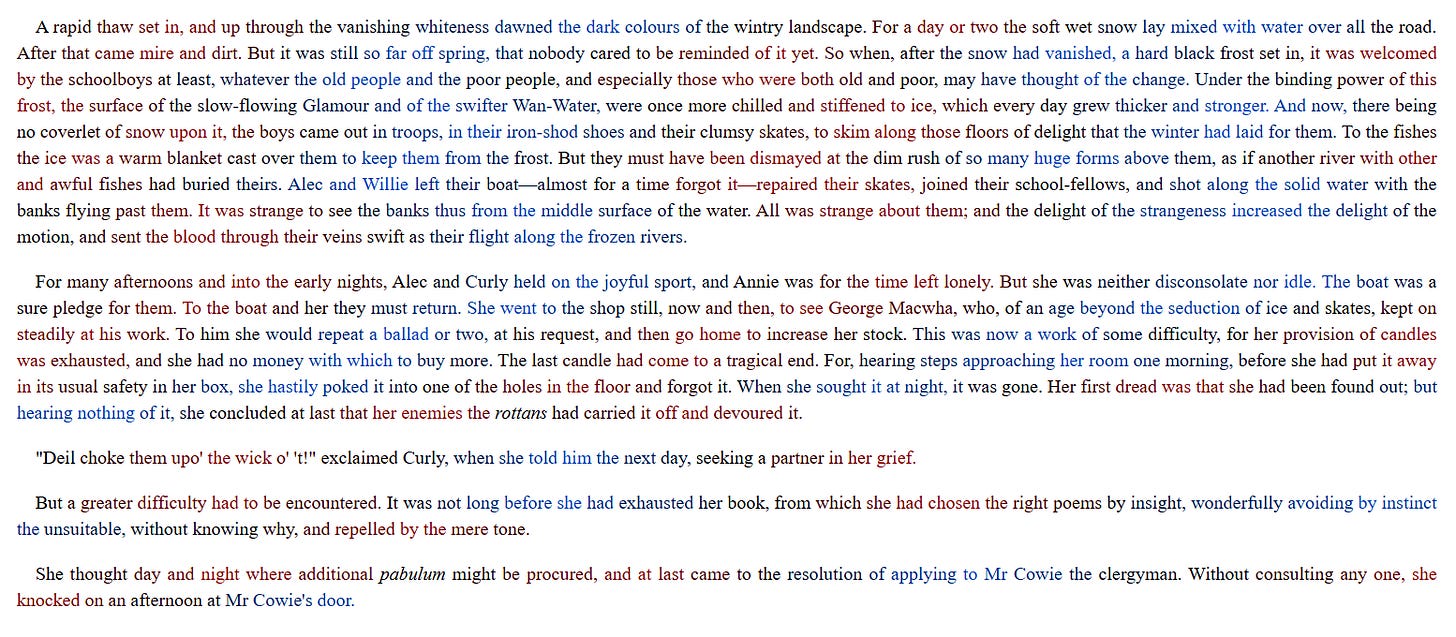
It does work
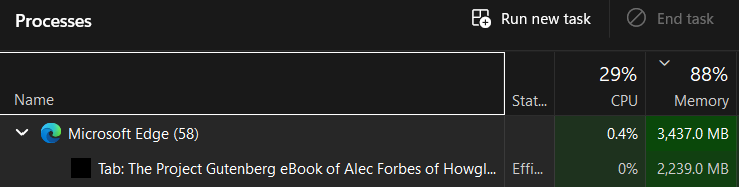
but at what cost
If I end up reading longs slogs of Project Gutenberg books on my laptop, I guess it’ll come in handy.
(blame Gwern for this particular use of my afternoon: https://gwern.net/ab-test#beeline-reader-text-highlighting)
Those interested in trying the extension for themselves need only ask for me to upload the files and send them over.